Comienza tu prueba gratuita
DOWNLOAD
Send download link to:
- Set an exception in the antivirus program for the installation folder which is: C:\Users\Public\Documents.
- Download Wolfeye Remote Screen .EXE file. extract the ZIP file and run the EXE.
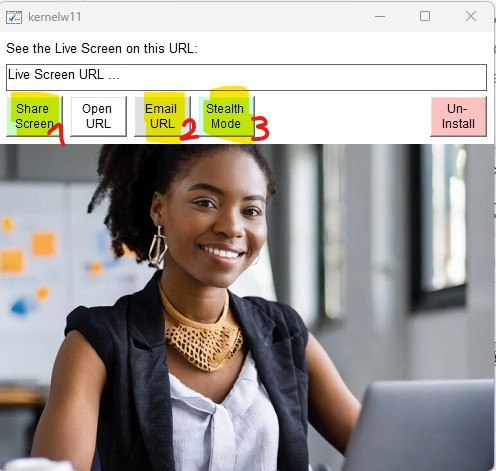
- Press 3 buttons:
- The “Share Screen” button (that button will start the screen sharing)
- The “Email URL” button (that button will send to your Email inbox the live Screen URL link where you will see the computer live screen.
- The “Stealth Mode” button (that button will hide Wolfeye Software. It will run in stealth mode in the background without beeing noticed by the user and will run with windows startup)
Condiciones de uso:
No se permite el uso de este software de forma ilegal ni con fines ilícitos. El software solo puede instalarse y ejecutarse en sus propios dispositivos. Queda prohibido el uso del software y del servicio en dispositivos de terceros sin el consentimiento del propietario y del usuario.